
Microsoft's 3D Viewer has been officially discontinued: the app stopped being developed, no longer shipped by default with Windows 11 and was removed from the Microsoft Store in July 2026. In practice, anyone who receives a 3D file — a product GLB, a part in OBJ, a character in FBX — lost the simple way to open it on Windows. This article explains what happened, what the alternatives are, and presents the solution we built: a free 3D Viewer for Windows APP.
What happened to Windows 3D Viewer?
3D Viewer was born in the era when Microsoft was betting on Paint 3D and 3D creation for everyone. As the strategy changed, those apps were abandoned: Paint 3D retired first, and 3D Viewer followed the same path — no more updates, out of the default installation and, finally, out of the store. Existing installations still work, but anyone who switches computers or reinstalls Windows can no longer download it through the official channel.
The problem is that the need didn't go away — quite the opposite. 3D models are increasingly common: e-commerce, augmented reality, 3D printing, architecture, education and games. Receiving a 3D file and not even being able to look inside became a frequent frustration.
The alternatives (and their problem)
Without the native viewer, the usual ways out are: installing professional modeling software like Blender — free, but heavy and far too complex for someone who just wants to look; using online viewers — which require uploading the file to a third-party server, a problem for confidential client projects; or giving up and asking the sender for screenshots.
None of those solves the most common case: double-click and see the model, with textures and animations, without learning a new tool and without sending the file to the cloud.
The free solution: 3D Viewer for Windows APP
It runs on Windows 11 and on Windows 10, without relying on the Microsoft Store — which is exactly where the old program vanished from.
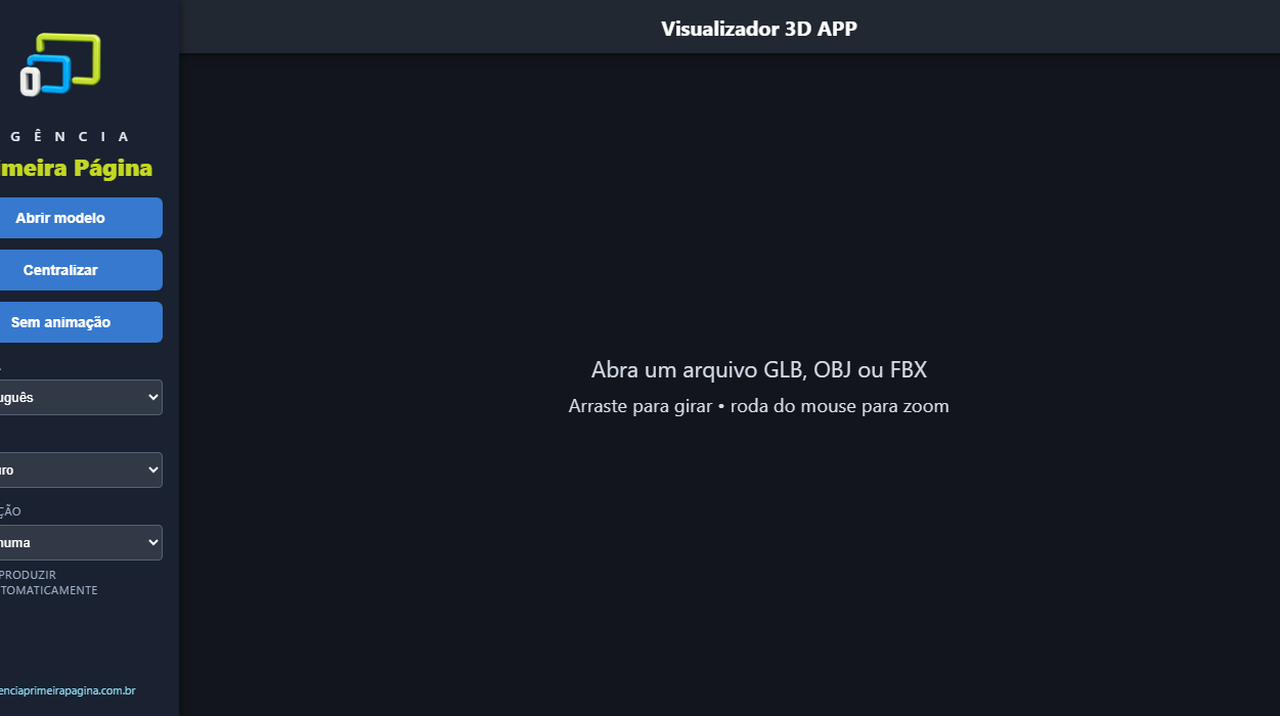
That's the gap we built the 3D Viewer for Windows APP to fill — a free, lightweight, straight-to-the-point application, offered as a gift to the 3D community. What it does:
- Opens full GLB: textures, PBR materials, skeletons and animations — the standard format of the 3D web and augmented reality.
- Opens OBJ with MTL and the textures from the same folder.
- Opens FBX with automatic conversion — nothing else to install.
- Controls animations: play, pause and switch between the model's movements.
- Light and dark theme, and an interface in 4 languages (Portuguese, Spanish, French and English).
- Runs locally: the model never leaves your computer — important for prototypes and client files.
Installation takes two clicks (and there's a portable version, no install). If Windows shows the "protected your PC" warning, that's normal behavior for new apps without a digital signature: click "More info" and then "Run anyway" — the full step-by-step is on the download page.
Which format should you ask for when someone sends you a model?
If you can choose, ask for GLB: it bundles geometry, textures and animations into a single file, which eliminates the classic "white model" problem (when textures get lost along the way). OBJ is great for static objects, but travels together with the MTL and the images — everything must stay in the same folder. FBX is common in game and animation production; the viewer converts it automatically.
After opening it: how to show the model to someone else
Opening the file solves half the problem. The other half shows up right after: showing the model to a client, a colleague or a supplier who doesn't have the app installed — and who will most likely look at it on a phone.
For that we keep a separate platform, webar.app.br: you upload the same GLB or GLTF and get a link. Whoever opens that link on a phone sees the model in augmented reality, by pointing the camera at the floor — with nothing to install. Handy for sending over WhatsApp, attaching to a quote or turning into a QR code on a label. The first model is free.
And if you just want to show the model to someone without them installing anything, our WebAR gallery opens 3D models right in the browser — and on a phone it places the model in the viewer’s space.
Opened white, grey or not at all: the five causes
When a model opens wrong, it is almost always one of these five things — and none of them is your computer's fault:
- Texture in a format the viewer cannot read. Images in WebP, AVIF or Basis compression inside the file leave the model white, even though the texture is there.
- Old specular-glossiness material. It is a way of describing materials that fell out of use; software that does not support it draws the object white.
- OBJ without its .mtl file or without the image folder. OBJ stores the shape, not the appearance: if the companion file did not come along, the model shows up grey.
- Compressed geometry. Models packed for the web open in some programs and not in others.
- Absurd scale or position. The model is there, but a thousand metres from the camera or the size of a building, and the screen looks empty.
If your file still will not open
Send it to us. We tell you which of the five causes is yours and, where possible, send the model back converted to a format that opens anywhere — in the viewer, in the browser and on a phone. A simple file usually comes back right away and at no cost.
If it is a routine job, the 3D file converter does the conversion on its own in the browser. And when the model has to be rebuilt or properly prepared for a catalogue, a website and augmented reality, that is our 3D modelling and animation service.
Download and try it now
If the end of Microsoft's 3D Viewer left you stranded, the replacement is ready: visit the 3D Viewer for Windows APP page, download it for free and open your first model in under a minute. And if your company needs custom 3D models, augmented-reality catalogs or interactive experiences — that's exactly what we do every day.
Frequently asked questions
Is it really free? What's the catch?
None. It's a gift from Agência Primeira Página, no sign-up and no ads — we specialize in 3D models and augmented reality, and the tool is our way of helping (and introducing ourselves to) people who work with 3D.
Does it work on Windows 11?
Yes. The app runs on Windows 11 and on Windows 10, and the package already includes everything it needs — nothing else to install.
What if I just want to view a 3D model without downloading anything?
You can do that too: our WebAR gallery shows 3D models right in the browser — and on your phone you can place the models in your space with augmented reality, no app to install.
Does it open STL for 3D printing?
In this version, the formats are GLB, OBJ/MTL and FBX. More formats may come in future versions.
Why does my 3D model open white or grey?
The five most common causes are: a texture in WebP, AVIF or Basis compression inside the file; an old specular-glossiness material; an OBJ sent without its .mtl file or image folder; compressed geometry that only some programs read; and an absurd scale or position, with the model too far from the camera. None of them is your computer's fault, and all are fixed by converting the file.