

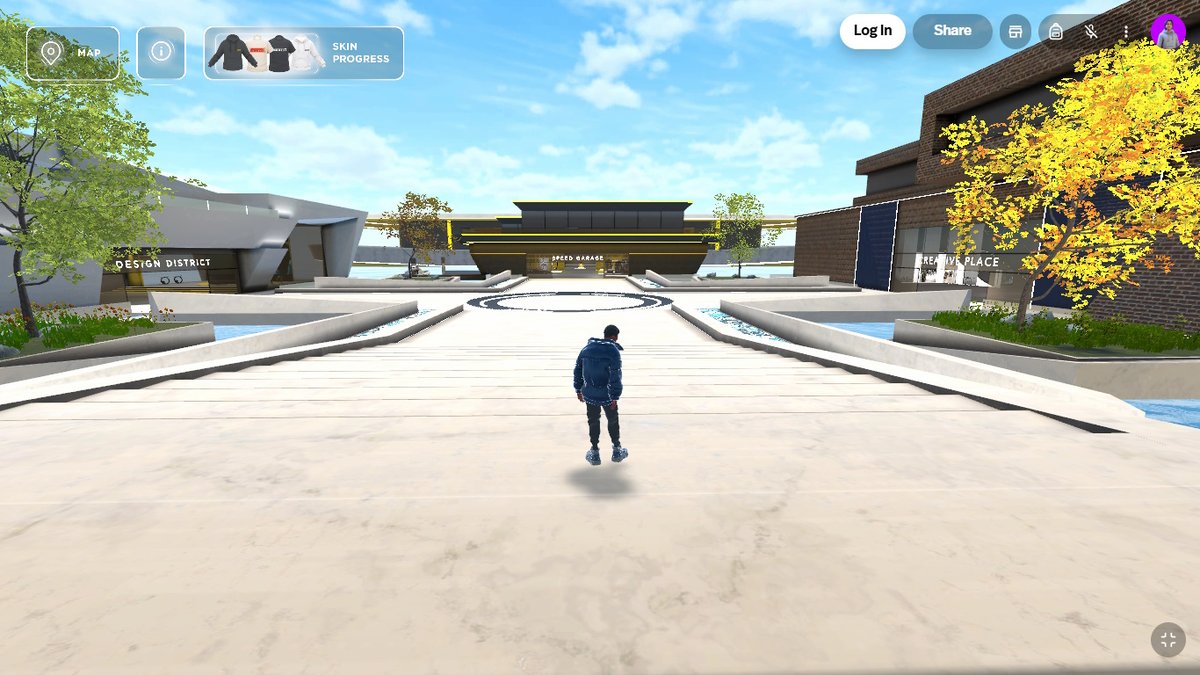
How virtual environments work in the metaverse
The term metaverse describes three-dimensional digital experiences in which people enter as avatars, explore spaces, and interact with content or other participants. These environments can function as booths, showrooms, stores, training rooms, auditoriums, and virtual events.
Unlike a video conference, the user has a sense of space and chooses where to go. They can approach a product, visit a room, talk to someone, or take part in an activity. Access can happen through the browser and, in compatible projects, through virtual reality headsets.
What is a virtual space used for?
Companies can showcase products that do not yet exist physically, bring together people from different locations, or keep an exhibition available beyond the duration of an event. Educational institutions can create laboratories and learning spaces. Teams can use immersive rooms for onboarding and training.
The environment needs a purpose. Reproducing a real building without adding utility may generate initial curiosity but little return engagement. Content, interaction, and programming give people a reason to stay and come back.
Access via browser or virtual reality
The browser reduces barriers because it requires no special equipment. Computers and mobile phones can access adjusted versions of the experience. VR headsets increase immersion but require device availability and attention to comfort.
A project can offer both paths. The architecture, graphics level, and controls must work according to each type of access.
Avatars and interaction between participants
Avatars represent users and can allow movement, gestures, and conversation. Community guidelines, moderation, and privacy are essential in spaces with public interaction.
It is also important to provide initial guidance. Maps, signage, and points of interest help visitors understand where to go. Very large, empty environments can cause disorientation.
Virtual stores, events, and showrooms
A 3D virtual store can present products in context and drive purchases. An event can bring together a stage, networking, content, and games. A showroom can allow visualization of models, configurations, and demonstrations.
Integrations with registration, CRM, payments, and access analytics connect the space to operations. These must be planned with security in mind and without making the entry process excessively bureaucratic.
How to measure usage?
Visitors, time spent, areas accessed, interactions, content viewed, and completed actions can all be tracked. For events, session participation and leads generated help evaluate outcomes.
Frequently asked questions
Is it necessary to install software? Not necessarily. Many environments can be accessed through the browser.
Are VR headsets required? No. Headsets are a higher-immersion option but do not need to be the only means of access.
Is it possible to customize everything? Scenes, avatars, objects, and activities can follow brand identity, subject to budget and performance constraints.
A digital environment with a reason to exist
The value of a metaverse project lies not only in the 3D scene. It comes from the experience offered: learning, meeting people, trying things out, buying, or participating. When access, content, and interaction are planned together, the virtual space becomes a useful channel for the brand.
How to define the environment's objective
Before modeling begins, the organization must choose the primary behavior: visiting an exhibition, gathering, learning, shopping, or attending a program. Each objective calls for a different architecture.
A showroom prioritizes products, comparison, and contact. An auditorium needs to organize an agenda, access, and participation. A training space requires activities, guidance, and assessment. Placing all resources in the same space can increase complexity without improving the experience.
The project must also define duration. A temporary event can concentrate resources around a specific date; a permanent environment requires renewable content, ongoing operation, and reasons for return visits.
Digital architecture and wayfinding
Virtual spaces do not need to follow all physical constraints, but users still rely on references. Visible entrances, pathways, maps, and meeting points reduce disorientation. Very long distances make navigation tiring, even without physical effort.
Elements can guide attention through light, color, scale, and motion. Signage should use plain language and remain legible across different screens. A brief introductory presentation teaches essential controls without slowing down those already familiar with the platform.
Brand identity in 3D
Applying colors and a logo is just the beginning. Shapes, materials, sounds, and interactions can express brand characteristics. A precision-oriented company might use organization and clarity; an entertainment brand might explore surprise and movement.
The environment must avoid an excess of elements competing for attention. Products, information, and calls to action should follow a clear hierarchy. Identity should support the user journey rather than hinder readability and performance.
Avatars, presence, and representation
Customization options allow participants to identify with their avatar, but a complex avatar creator can delay access. Simple, inclusive presets may be sufficient for a brief event.
Gestures and proximity aid communication, while names and speaking indicators organize conversations. Blocking, reporting, and moderation features must exist when strangers can interact. The organization must define a code of conduct and an incident response process.
Spatial audio and conversations
Proximity-based audio can simulate group conversations, but crowded environments require control. Rooms, distance limits, and a mute option improve the experience. Participants need to know when their microphone is active.
Talks can combine broadcast and interaction. Questions, captions, and supporting materials should be accessible without competing with the main content. Recording requires proper disclosure and consent.
Hybrid events
An event can connect a physical venue and a virtual environment. Screens display remote participants, while cameras and streaming bring the stage to the digital space. This integration requires its own team and script; simply broadcasting a fixed camera rarely delivers an equivalent experience.
Activities can be designed for both audiences, with shared questions, challenges, and content. Time zones, connection capacity, and remote support must also be considered.
Stores and commerce in 3D environments
Three-dimensional exploration can contextualize products, but the purchasing steps must remain simple. Information, pricing, variants, delivery, and policies must be readily available. The transition to payment must not cause the user to lose their item or be removed from the environment without warning.
Integration with inventory and order management avoids offering unavailable items. When digital products or virtual benefits are part of the experience, access and ownership rules must be clear.
Performance on browsers and mobile devices
3D environments require processing power. Models, textures, lighting, and the number of concurrent participants all affect performance. The project must define minimum device requirements and test on equipment representative of the target audience.
Progressive loading, optimization, and quality levels help accommodate different devices. A lighter alternative can preserve essential content for users unable to access the full version.
Accessibility in the virtual space
Keyboard navigation, configurable controls, captions, contrast, and alternatives to movement-based interactions broaden participation. Activities should not rely exclusively on audio, color, or fine motor precision.
Camera movements and locomotion can cause discomfort. Options such as teleportation, adjustable speed, and seated mode help. Communicating requirements in advance allows participants to prepare.
Participant privacy and data
Registration should request only the necessary information. Voice, messages, behavior, and interactions may constitute personal data, and users need to understand what is recorded. Environments aimed at children or sensitive contexts require additional review.
Access profiles define who enters areas, views information, or manages content. Logs support operations and investigations but require protection and a defined retention policy.
Operations during an event
Moderators welcome participants, answer questions, and intervene when necessary. The technical team monitors servers, streaming, and integrations. An external support channel helps those who have not yet been able to join.
Rehearsals should simulate the number of users, presentations, room transitions, and failures. Speakers need to test audio and controls. A contingency plan can make a broadcast or content available if the environment becomes unavailable.
How to measure beyond avatar count
Visits, time spent, and areas accessed are initial indicators. Session participation, product interactions, meetings, return visits, and completed actions reveal depth. Surveys can assess ease of use and perceived value.
Metrics must respect privacy and avoid unnecessary surveillance. The goal is to improve the service and understand the event, not to log every movement without purpose.
Checklist for requesting a metaverse project
Define the objective, audience, devices, simultaneous capacity, duration, and regions. List environments, activities, avatars, communication channels, and integrations. Provide brand identity guidelines and any available 3D models.
Ask about hosting, performance, moderation, accessibility, support, and asset ownership. Plan for load testing, team training, data handling, and an alternative access path.
Spatial experience with purpose
The metaverse does not need to replace websites, stores, or meetings. It is most suitable when presence, exploration, and spatial interaction add something meaningful. Consciously choosing what remains on a standard page and what gains a 3D form makes the project lighter, clearer, and more valuable.
After launch, updates should stem from observed behavior and needs. Ignored areas can be simplified; high-traffic points can receive new content. This evolution avoids maintaining an expensive space merely for novelty and focuses investment on the experiences the audience actually uses.