
Anyone searching for “website creation with SEO” wants, at bottom, something simple: a site that shows up on Google when customers search for what the company sells. The problem is that SEO has become a badge every quote promises, and many people only discover months later that the new site was not even being read properly by the search engine. In this guide, we separate what must be ready on launch day, which is the responsibility of whoever builds the site, from what depends on ongoing work. And we show how to check each item yourself, before and after you pay.
What “a site with SEO” really means
SEO, search engine optimization, has two layers that are often sold as one:
- The build. How the site is made: whether Google can find every page, read the text, understand what each page is about and load quickly on mobile. This is solved once, at creation, and it is what this guide covers.
- The ongoing work. New content, answers to the questions customers ask, the company's Google profile, reviews and mentions on other sites. This takes months and does not end at launch.
A well-built site does not guarantee the first page. But a poorly built site almost guarantees you won't get there, no matter how good the content is. And be wary of anyone who promises a ranking: Google itself, on the page where it advises businesses on hiring SEO help, warns that no one can guarantee first place in the results.
The 12 items that must be ready at launch
- One page for each main service or product. Google shows pages, not sites. If everything the company does sits on a single page, it competes for all searches at once and wins none. A business that sells air-conditioning installation and maintenance needs one page for each.
- Readable addresses. /instalacao-de-ar-condicionado tells Google and the customer what the page is about. /pagina?id=37 tells them nothing.
- A unique title and description on every page. These are the blue text and the two lines that appear in the search result. They must differ on each page and fit on screen: in practice, up to about 60 characters for the title and about 155 for the description. A title cut off mid-sentence loses clicks.
- One main heading per page, with subheadings in order. The main heading (H1) states the topic; the subheadings (H2, H3) organize the rest. This is how the search engine understands the structure of the text.
- Text that Google reads without having to wait. Many modern sites assemble their content in the browser after loading. Google can read this, but with a delay and not always in full. The safest approach is for the server to deliver the page with the text already in place. To check: open the page, press Ctrl+U and look for a sentence from your text in the code. If it isn't there, the text only appears later.
- Designed for mobile first. Google indexes sites by their mobile version. If the menu, a block of text or a form exists only on the desktop version, then as far as the search engine is concerned it doesn't exist.
- Speed within Google's targets. Google measures three experience signals, known as Core Web Vitals: the main content should appear within 2.5 seconds, the page should respond to a tap within 200 milliseconds, and the layout should not jump around while loading. The free PageSpeed Insights tool shows all three.
- Secure address (https). The padlock in the browser. Without it, the browser warns that the site is not secure, and the customer leaves before reading anything.
- Sitemap and a rules file for robots. The sitemap.xml lists the pages you want on Google; the robots.txt tells robots what they may visit. A mistake in this file can block the entire site or, as happened on our own, block the AI tools' robots without anyone noticing.
- Each page's official address properly tagged. The “canonical” tag tells Google which is the official version of a page when more than one address leads to the same content. Set incorrectly, it hides pages from the index. This was the mistake we found on our own blog: 42 of 48 articles were missing from Google because of it.
- Structured data. Code invisible to the visitor that describes the company to the search engine: name, address, phone, opening hours, frequently asked questions. It helps Google, and AI tools as well, understand who you are and what you offer.
- Search Console and measurement configured, in the company's name. Google Search Console is the free dashboard that shows which searches bring visitors to the site, which pages are in the index and which returned errors. It must be set up on launch day, with owner access for the company, not just for whoever built the site.
If the new site replaces an old one, the risk is different
Changing sites is the moment when most companies lose traffic. The reason is almost always the same: the old pages that already appeared on Google change address, and no one tells the search engine. Visitors arriving through an old link land on an error page, and the ranking earned over years disappears within weeks.
The safeguard has a name: 301 redirect. Before switching, make a list of the old addresses that receive visits (Search Console shows them) and state, for each one, which new page replaces it. On switch day, each old address automatically sends visitors to the new one. It is a few hours of work that preserves years of results.
What doesn't come ready, and how long it takes
With the right build, Google can find and read the site. For it to choose to show the site, the ongoing part comes in:
- Content that answers what customers ask. Price, lead time, how it works, the difference between options. Each question answered well is one more search where the site can appear.
- The company's Google profile. For a local business, it appears on the map before websites do. It needs the right category, photos, opening hours and reviews.
- Mentions and links from other sites. Industry associations, suppliers, local press, partners.
The timing varies with competition. On our own site, after fixing the build and organizing the content, clicks from Google went from 20 to 161 in 28 days, compared with the previous 28 days. In competitive markets, the same movement can take much longer. What doesn't change is the order: without the right build, the content doesn't show up.
How to check it yourself in 15 minutes
- Does Google know your pages? Search site:seudominio.com.br on Google. If far fewer pages appear than the site has, something is preventing it from being read.
- Is the text in the code? Press Ctrl+U on the page and look for a sentence from the text.
- Is it fast on mobile? Paste the address into PageSpeed Insights and look at the mobile tab.
- Are the titles different? Open three pages and look at the name on the browser tab. If they all show only the company name, the titles were never written.
- Are the robots allowed in? Open seudominio.com.br/robots.txt. A lone Disallow: / line, with nothing before it, blocks everything.
- Do you have access to Search Console? If no one at the company can log in, ask whoever built the site to add your email as an owner.
The questions to ask before hiring
- Whose name will the domain and accounts be in? Domain, hosting, Search Console and analytics should belong to the company.
- Will there be a page for each service? And who writes their text.
- Does the text come ready from the server? Ask to see a site they have built and run the Ctrl+U test.
- If I already have a site, will you do the redirects? The answer must be yes, using the list of old addresses.
- Will Search Console be delivered configured? With access for the company.
- What is included after launch? Adjustments, content, monitoring. Knowing what is not included avoids the frustration of the third month.
The mistakes we see most
- A single-page site for a company that sells several services.
- Text inside images, such as a banner with the list of services written into the artwork. The customer reads it; Google doesn't.
- Switching sites without redirects and losing the pages that already appeared.
- A domain registered in the agency's name or a former employee's.
- A forgotten block in robots.txt, left over from when the site was in testing.
- Expecting results in a week and giving up before Google has properly read the site.
A real example: a client’s site
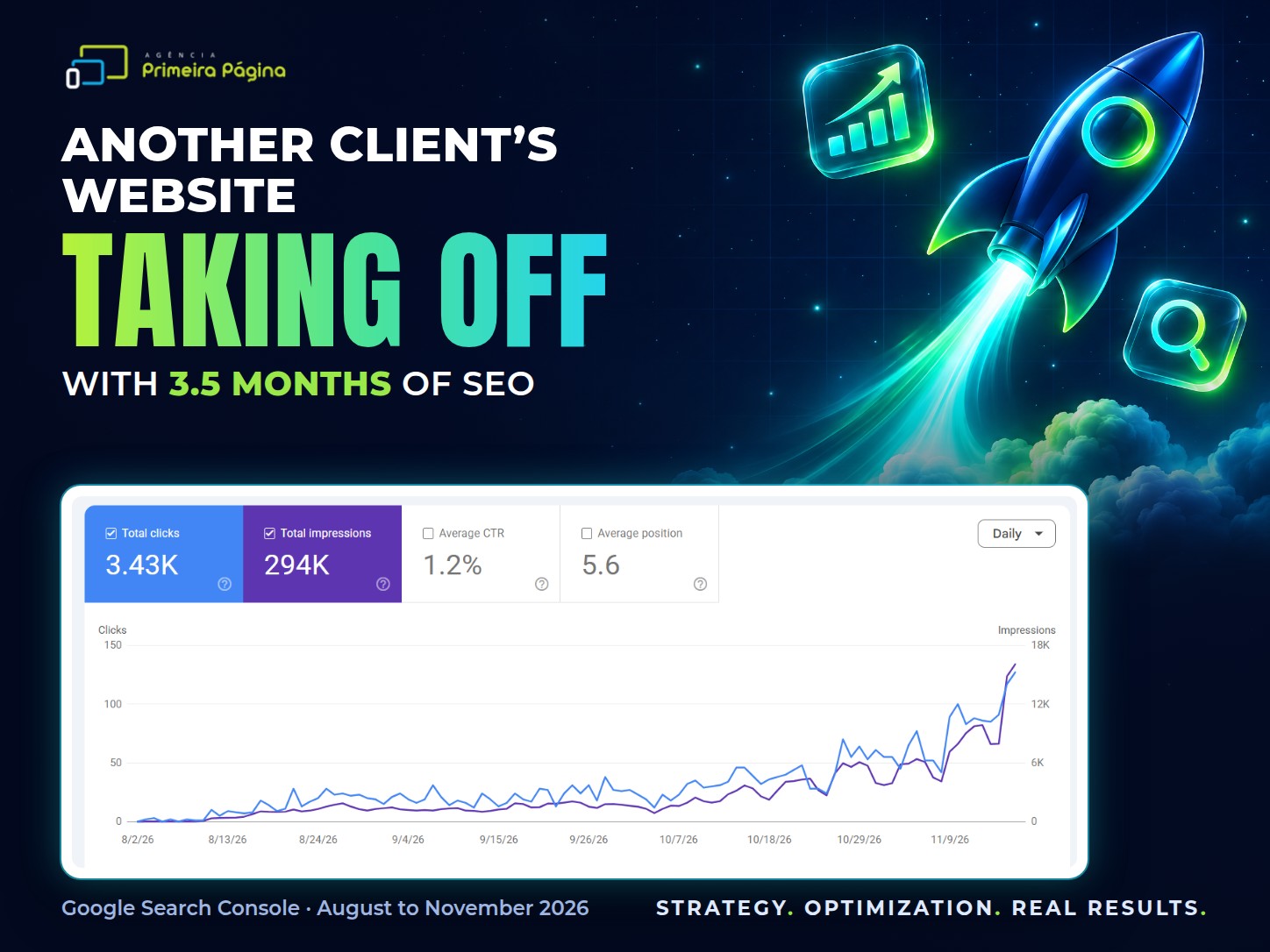
This is what happens when Google can find and read every page. The chart below comes from the Google Search Console of one of the agency’s clients, from August to November 2026. In three and a half months of SEO, the site went from under 10 clicks a day to more than 120, adding up to 3.43K clicks and 294K impressions, with an average position of 5.6. All organic search, no ads.
What this means for your business
“A site with SEO” is not a special type of site. It is a site built the right way, verifiable item by item. The 12 points in this guide are the part that whoever builds the site resolves all at once, and they work as a checklist for comparing quotes: anyone who can't explain how they meet each one probably doesn't.
At our agency, website creation already comes with these items ready and with Search Console in the company's name. When the site already exists and doesn't show up, the SEO agency starts by diagnosing these same points. To see the real cases cited in this guide, read 48 articles published, 42 missing from Google's index, from 20 to 161 clicks on Google in two months and your site may be blocking ChatGPT without you knowing. And if the idea is to build the site with an AI tool, see what AI does well and where it needs people.
Sources
- Google Search Central: SEO starter guide, guidance on hiring an SEO professional, mobile-first indexing, canonical, sitemaps, robots.txt and structured data.
- Google, web.dev: Core Web Vitals targets (LCP up to 2.5 s, INP up to 200 ms and CLS up to 0.1).
- Agência Primeira Página's experience on its own site and on client sites, with Google Search Console data.
Frequently asked questions
What is SEO-friendly website development?
It means building the site from the start so Google can find, read and understand every page: one page per service, readable URLs, a unique title and description for each page, text delivered ready from the server, a full mobile version, speed within target, https, a correct sitemap, robots.txt and canonical tags, structured data, and Search Console set up.
Will an SEO-friendly website show up on the first page of Google?
Not automatically. Building it the right way lets Google read the site, but reaching the top also depends on content, your business profile, reviews and mentions on other sites, and that takes months. Google itself warns that no one can guarantee the number one spot.
How long does a new website take to show up on Google?
Pages are usually found within days or weeks, as long as the site is well built and Search Console is set up. Climbing the rankings for the searches that matter takes months and depends on the competition. On our agency’s own site, after the adjustments, clicks from Google went from 20 to 161 over a 28-day period, compared with the previous period.
How can I tell whether Google is reading my website?
Search for site:yourdomain.com in Google to see how many pages it knows about, open the page source with Ctrl+U and look for a sentence from your text, and check in Google Search Console which pages are indexed and which returned errors.
What happens to my SEO when I switch websites?
If the page addresses change without a 301 redirect, the old pages that used to appear on Google start returning errors and you lose your ranking. Before the switch, list the old URLs that get visits and point each one to the new page that replaces it.
What should I ask before hiring someone to build an SEO-friendly website?
Whose name the domain and accounts will be under, whether there will be a separate page for each service, whether the text is delivered ready from the server, whether redirects from the old site are included, whether Search Console will be handed over already set up for your company, and what is included after launch.